
# API调用
# 获取API调用密钥
请点击页面右上角的设置按钮,获取API调用的auth token
# 第三方模型生成API调用
# 上传文件
在发起图片或视频生成任务前,如果需要传入参考图片/视频,需要先上传文件获取外网可访问的URL,再将该URL填入生成任务的参数中。
Curl请求示例:
curl -X POST https://art.huya.info/openapi/v1/file/upload \
  -H "Authorization: Bearer AI-**" \
  -F "file=@/path/to/your/image.jpg"
Python请求示例:
import requests

url = "https://art.huya.info/openapi/v1/file/upload"
headers = {
    "Authorization": "Bearer AI-**"  # 替换为你的key
}

# 上传图片
with open("/path/to/your/image.jpg", "rb") as f:
    files = {
        "file": ("image.jpg", f, "image/jpeg")
    }
    response = requests.post(url, headers=headers, files=files)
    result = response.json()
    image_url = result["url"]
    print(f"上传成功,图片URL: {image_url}")

# 上传视频
with open("/path/to/your/video.mp4", "rb") as f:
    files = {
        "file": ("video.mp4", f, "video/mp4")
    }
    response = requests.post(url, headers=headers, files=files)
    result = response.json()
    video_url = result["url"]
    print(f"上传成功,视频URL: {video_url}")
返回示例:
{
    "success": true,
    "url": "https://athena-haicong-llm-external.oss-cn-guangzhou.aliyuncs.com/haiyi%2F20260520%2Fd7ca6dff-eddf-4cc8-b872-0e2ac244e235.png?OSSAccessKeyId=LTAI5tG74JJTN8VrQ6eTGvBa&Expires=2085109558&Signature=q5mZSg7NEM3pIvdY6jcefLL3VeE%3D",
    "filename": "image.jpg",
    "file_size": 102400
}
返回字段说明:
- success:上传是否成功
- url:外网可访问的文件URL,可直接用作生成任务中的
images或key_frames参数值 - filename:原始文件名
- file_size:文件大小(字节)
支持上传图片(jpg/png/webp/gif等)、视频(mp4/mov等)、音频(mp3/wav等)文件
# 获取模型列表
获取当前平台支持的所有可用模型,可按模型类型筛选。
支持的模型类型(model_types):
- text2image:文生图
- image2image:图生图
- text2video:文生视频
- image2video:图生视频
- video-edit:视频编辑
- style-trans:风格转换
- text2music:文生音乐
- text2speech:文生语音
Curl请求示例(获取所有模型):
curl -X GET 'https://art.huya.info/openapi/v1/model/list' \
  -H 'Authorization: Bearer AI-**'
Curl请求示例(按类型筛选):
curl -X GET 'https://art.huya.info/openapi/v1/model/list?model_types=text2image&model_types=image2video' \
  -H 'Authorization: Bearer AI-**'
Python请求示例:
import requests

# 获取所有模型
url = "https://art.huya.info/openapi/v1/model/list"
headers = {"Authorization": "Bearer AI-**"}
response = requests.get(url, headers=headers)
models = response.json()
for m in models:
    print(f"{m['provider']}/{m['model']} ({m['type']}) - {m['label']}")

# 按类型筛选
url = "https://art.huya.info/openapi/v1/model/list?model_types=text2image&model_types=image2video"
response = requests.get(url, headers=headers)
models = response.json()
for m in models:
    print(f"{m['provider']}/{m['model']} ({m['type']}) - {m['label']}")
返回示例:
[
    {"provider": "google", "model": "gemini-3-pro-image-preview", "label": "Nano Banana Pro", "type": "image2image"},
    {"provider": "google", "model": "gemini-3.1-flash-image-preview", "label": "Nano Banana Flash", "type": "text2image"},
    {"provider": "kwai", "model": "kling-v3", "label": "可灵 V3", "type": "image2video"},
    {"provider": "kwai", "model": "kling-v3", "label": "可灵 V3", "type": "text2video"},
    ...
]
返回字段说明:
- provider:模型供应商标识,用于提交生成任务时指定
- model:模型标识,用于提交生成任务时指定
- label:模型显示名称
- type:模型类型,用于提交生成任务时指定
# 获取模型详情及参数配置
获取指定模型的详细信息,包括参数规则(parameter_rules),用于了解该模型支持哪些参数、参数类型、默认值、取值范围等。
Curl请求示例:
curl -X GET 'https://art.huya.info/openapi/v1/model/info?provider=kwai&model=kling-v3&type=image2video' \
  -H 'Authorization: Bearer AI-**'
Python请求示例:
import requests

url = "https://art.huya.info/openapi/v1/model/info"
params = {
    "provider": "kwai",
    "model": "kling-v3",
    "type": "image2video"
}
headers = {"Authorization": "Bearer AI-**"}
response = requests.get(url, headers=headers, params=params)
model_info = response.json()

# 查看模型参数规则
for rule in model_info["parameter_rules"]:
    print(f"参数名: {rule['name']}, 类型: {rule['type']}, 必填: {rule['required']}, 默认值: {rule.get('default')}")
    if rule.get("options"):
        print(f"  可选值: {[opt['value'] for opt in rule['options']]}")
    if rule.get("min") or rule.get("max"):
        print(f"  范围: {rule.get('min')} ~ {rule.get('max')}")
返回示例(可灵V3图生视频):
{
    "model": "kling-v3",
    "label": "可灵 V3",
    "description": "快手最新发布的顶尖文本生成视频模型...",
    "model_type": "image2video",
    "parameter_rules": [
        {
            "name": "prompt",
            "type": "text",
            "label": "提示词",
            "required": true
        },
        {
            "name": "key_frames",
            "type": "dict[image]",
            "label": "首尾帧",
            "required": true,
            "keys": [
                {"key": "start", "required": true, "label": "首帧"},
                {"key": "end", "required": false, "label": "尾帧"}
            ]
        },
        {
            "name": "mode",
            "type": "string",
            "label": "生成模式",
            "required": true,
            "default": "std",
            "options": [
                {"value": "std", "label": "标准模式 (720p&24fps)"},
                {"value": "pro", "label": "专家模式 (1080p&24fps)"}
            ]
        },
        {
            "name": "duration",
            "type": "int",
            "label": "视频时长(秒)",
            "required": true,
            "default": 8,
            "min": 3,
            "max": 15
        },
        {
            "name": "sound",
            "type": "boolean",
            "label": "是否生成音频",
            "required": true,
            "default": false
        }
    ],
    "provider": {
        "provider": "kwai",
        "label": "快手",
        "supported_model_types": ["text2video", "image2video", ...]
    }
}
参数规则(parameter_rules)字段说明:
- name:参数名,即提交生成任务时
parameters中使用的键名 - type:参数类型,常见类型如下:
| 类型 | 说明 | 传值示例 |
|---|---|---|
| string | 字符串 | "std" |
| int | 整数 | 8 |
| float | 浮点数 | 0.5 |
| boolean | 布尔值 | true / false |
| text | 文本(提示词) | "跳舞起来" |
| image | 单张图片URL | "https://..." |
| video | 单个视频URL | "https://..." |
| audio | 单个音频URL | "https://..." |
| array[string] | 字符串数组 | ["a", "b"] |
| array[number] | 数字数组 | [1, 2, 3] |
| array[image] | 图片URL数组 | ["https://...", "https://..."] |
| array[video] | 视频URL数组 | ["https://...", "https://..."] |
| array[audio] | 音频URL数组 | ["https://...", "https://..."] |
| dict[image] | 图片字典 | {"start": "https://...", "end": "https://..."} |
- required:是否必填
- default:默认值
- min / max:数值类型的取值范围
- options:可选值列表,每个选项包含 value(实际传值)和 label(显示名称)
- keys:dict 类型参数的键定义,包含 key(键名)、required(是否必填)、label(显示名称)
- size:array 类型的最大长度
- image_config:图片参数的约束(如最大文件大小、最小宽高等)
- help:参数说明文字
建议在提交生成任务前,先通过此接口查询模型的参数配置,确保传入正确的参数名和参数值
# 图片生成
提交生成任务:
import requests
import json

url = "https://art.huya.info/openapi/v1/generate/image"

payload = {
   "model": {
      "provider": "google",  # 指定供应商,可通过获取模型列表接口查看
      "model": "gemini-3-pro-image-preview",  # 指定模型id,可通过获取模型列表接口查看
      "type": "image2image"  # text2image、image2image 等,可通过获取模型详情接口查看支持的参数
   },
   "parameters": {
      "prompt": "把草莓改成苹果",  # 提示词
      "images": [
         "https://athena-haicong-llm-external.oss-cn-guangzhou.aliyuncs.com/haiyi%2F20260130%2Fd7ca6dff-eddf-4cc8-b872-0e2ac244e235.png?OSSAccessKeyId=LTAI5tG74JJTN8VrQ6eTGvBa&Expires=2085109558&Signature=q5mZSg7NEM3pIvdY6jcefLL3VeE%3D"  # 参考图片,必须是外网可访问的url,可通过上面的上传文件接口获取
      ]
      # 更多参数可通过获取模型详情接口查看
   }
}
headers = {
   'Content-Type': 'application/json',
   'Authorization': 'Bearer AI-**',  # 替换为你的key
}

response = requests.request("POST", url, headers=headers, json=payload)

print(response.json())
输出示例,取到task_id:
{'task_id': 24317, 'status': 'submitted', 'message': 'Task has been submitted for processing'}
轮询生成结果:
import requests

url = "https://art.huya.info/openapi/v1/generate/result/{task_id}"  # 替换task_id

payload={}
headers = {
   'Authorization': 'Bearer AI-**',  # 替换为你的key
   'Content-Type': 'application/json',
}

response = requests.request("GET", url, headers=headers, data=payload)

print(response.json())
# 视频生成
import requests
import json

url = "https://art.huya.info/openapi/v1/generate/image"

payload = {
    "model": {
        "model": "Kling-3.0",   # 指定模型id,可通过获取模型列表接口查看
        "provider": "tencent",  # 指定供应商,可通过获取模型列表接口查看
        "type": "image2video"   # 图生视频,或者文生视频
    },
    "parameters": {  # 不同模型参数不同,可通过获取模型详情接口查看
        "key_frames": {
            "start": "https://athena-haicong-llm-external.oss-cn-guangzhou.aliyuncs.com/haiyi%2F20260430%2F6b001deb-bce5-4aa3-9977-65f5c4b123b9.jpg?OSSAccessKeyId=LTAI5tG74JJTN8VrQ6eTGvBa&Expires=2092877464&Signature=088k8sIRSIV1qt5eUppxUIUK17Y%3D"  # 参考图片URL,可通过上面的上传文件接口获取
        },
        "mode": "std",
        "Duration": 3,
        "sound": false,
        "prompt": "跳舞起来"
    },
}
headers = {
   'Content-Type': 'application/json',
   'Authorization': 'Bearer AI-**',  # 替换为你的key
}

response = requests.request("POST", url, headers=headers, json=payload)

print(response.json())
结果轮询和前面的图片生成一致
# AI应用API调用
推荐使用。将工作流ComfyUI发布为AI应用后,可以更加简单的API调用
# 提交一个AI应用执行任务
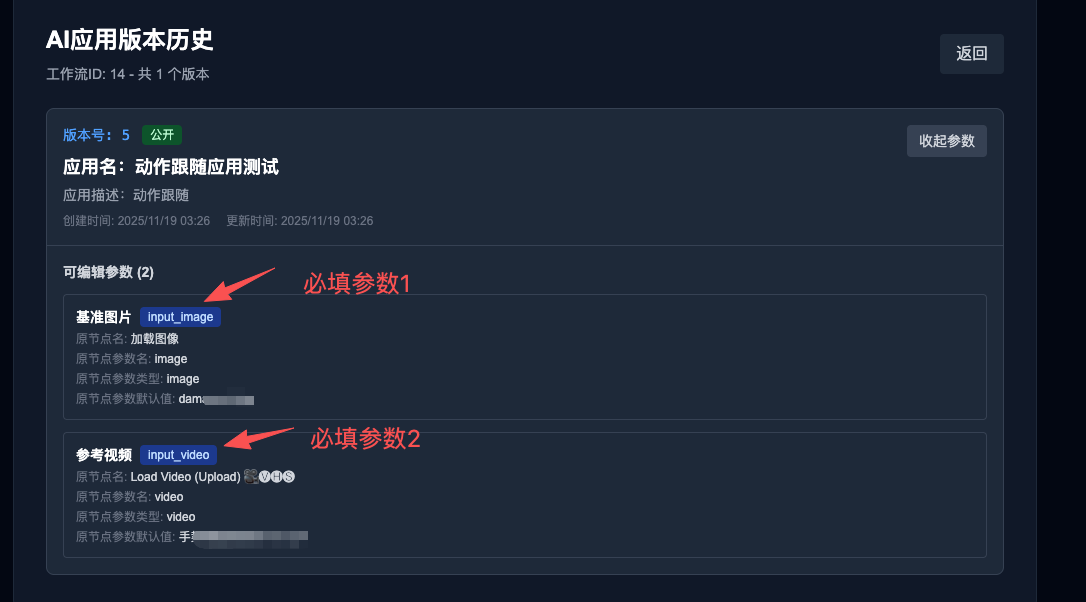 假如我的AI应用定义的参数如上所示,那么我请求时,需要传入:
- workflow_id:任何时候都必填,你的工作流id
- cluster_name:任何时候都必填,集群名,当前可选有 GPU-4090、GPU-A800
- version_id:选填,不填时默认用最新版本
- input_image:自定义的参数1,类型为图片文件
- input_video:自定义的参数2,类型为视频文件
Curl请求示例:
curl --location --request POST 'https://art.huya.info/openapi/v1/workflow/apps/run' \
--header 'Authorization: Bearer 你的token' \
--form 'workflow_id="1234"' \
--form 'cluster_name="GPU-A800"' \
--form 'input_image=@"/demo.jpg"' \
--form 'input_video=@"/demo.mp4"'
python代码请求示例:
import requests
url = 'https://art.huya.info/openapi/v1/workflow/apps/run'
headers = {
    'Authorization': 'Bearer YOUR_TOKEN'
}
files = {
    'input_image': open('demo.jpg', 'rb'),
    'input_video': open('demo.mp4', 'rb')
}
data = {
    'workflow_id': '1234',
    'cluster_name': 'GPU-A800'
}
response = requests.post(url, headers=headers, data=data, files=files)
print(response.status_code)
print(response.text)
请替换上面示例中的参数为你的
执行后会立刻返回一个task_id,用于查询任务执行状态以及获取结果输出,例如:
{
    "code": 0,
    "msg": "success",
    "data": {
        "task_id": 230
    }
}
# 轮询结果输出
Curl请求示例:
curl --location --request GET 'https://art.huya.info/openapi/v1/workflow/apps/task/215' \
--header 'Authorization: Bearer 你的token'
Python请求示例:
import requests
url = "https://art.huya.info/openapi/v1/workflow/apps/task/215"
payload={}
headers = {
   'Authorization': 'Bearer 你的token'
}
response = requests.request("GET", url, headers=headers, data=payload)
print(response.text)
返回值举例:
{
    "code": 0,
    "msg": "success",
    "data": {
        "status": "success",
        "progress": {
            "curr_node": {
                "id": 0,
                "title": "Unknown Node",
                "progress": 0
            },
            "total_progress": 94
        },
        "outputs": [
            {
                "id": "81",
                "title": "Video Combine 🎥🅥🅗🅢",
                "output": "https://art.huya.info/api/view?type=output&filename=HAIYI_20251119033840_r-animate-aijuxi_00001-audio.mp4",
                "error_type": "info"
            }
        ]
    }
}
字段含义:
- status: 四种状态 pending、running、success、fail
- progress:进度条,curr_node代表当前执行中的节点,total_progress代表总进度,94表示94%进度
- outputs:输出列表,可能存在多个节点的输出,当error_type为info时输出是媒体url,如果为warning则是此节点告警字符串,如果是error则是此节点错误字符串
# 获取各GPU集群状态
用于获取集群状态,判断哪些集群可用,以及集群GPU资源剩余量
Curl请求示例:
curl --location --request GET 'https://art.huya.info/openapi/v1/workflow/cluster/all_active_clusters_status' \
--header 'Authorization: Bearer 你的token'
Python请求示例:
import requests

url = "https://art.huya.info/openapi/v1/workflow/cluster/all_active_clusters_status"

payload={}
headers = {
   'Authorization': 'Bearer 你的token'
}

response = requests.request("GET", url, headers=headers, data=payload)

print(response.text)
返回示例:
{
    "code": 0,
    "msg": "success",
    "data": [
        {
            "name": "GPU-4090",
            "display_name": "GPU-4090-24GB-单卡(推荐)",
            "curr_nodes": 2,
            "max_nodes": 22
        },
        {
            "name": "GPU-A800",
            "display_name": "GPU-A800-80GB-单卡(推荐)",
            "curr_nodes": 8,
            "max_nodes": 21
        },
        {
            "name": "GPU-A800x2",
            "display_name": "GPU-A800-80GB-2卡",
            "curr_nodes": 0,
            "max_nodes": 6
        },
        {
            "name": "GPU-A800x4",
            "display_name": "GPU-A800-80GB-4卡",
            "curr_nodes": 0,
            "max_nodes": 2
        },
        {
            "name": "GPU-A800x8",
            "display_name": "GPU-A800-80GB-8卡",
            "curr_nodes": 0,
            "max_nodes": -1
        }
    ]
}
其中:
- name: 集群名称,用于提交任务时指定集群
- display_name: 集群显示名称
- curr_nodes: 当前已存在的实例副本数(系统会根据任务队列自动扩缩容,故此值会动态变化)
- max_nodes: 最大可扩容至的实例副本数,-1表示暂时无法预估此值(GPU池子资源剩余量会被其它任务消耗而动态变化,故此值会动态变化)
# ComfyUI原生API调用
不推荐使用,建议用AI应用API调用
这里使用ComfyUI原生接口兼容形式调用,调用略复杂
小提示
不再建议使用此原生API,复杂性较高稳定性较低,请改用上面的AI应用API调用,可以达到同样目的
# 提交一个工作流执行任务
# 先从海艺下载对应工作流的API,参考下图:
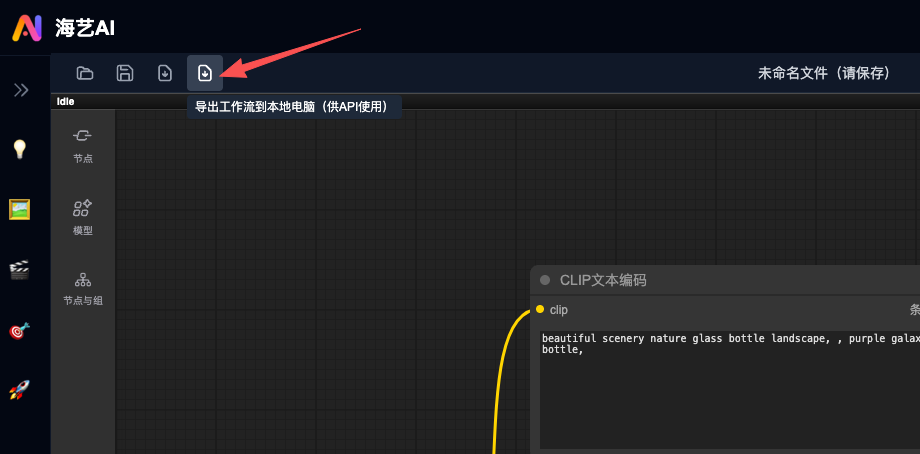 读取这个comfyui api json
comfyui_api_json = json.load(open("./test_comfyui_api_pro.json"))
# 再上传文件输入,如图片、视频、音频等
API接口:
curl -X POST https://art.huya.info/openapi/v1/workflow/upload/file -H "Authorization: Bearer AI-xxx" -F "file=@/xxx/input0.jpg"
python示例:
url = "https://art.huya.info/openapi/v1/workflow/upload/file"
headers = {
    "Authorization": f"Bearer {AUTH_TOKEN}"
}
# 图片
with open("/Users/bob/Downloads/videos_images_audios/站立裙子人物图.jpg", "rb") as f:
    files = {
        "file": ("站立裙子人物图.jpg", f, "image/jpeg")  # 设置文件名和MIME类型
    }
    response = requests.post(url, headers=headers, files=files)
    image_name = response.json()["data"]["filename"]
    print(f"Upload image name: {image_name}")
# 视频
with open("/Users/bob/Downloads/videos_images_audios/手势舞蹈视频demo.mp4", "rb") as f:
    files = {
        "file": ("手势舞蹈视频demo.mp4", f, "video/mp4")  # 设置文件名和MIME类型
    }
    response = requests.post(url, headers=headers, files=files)
    video_name = response.json()["data"]["filename"]
    print(f"Upload video name: {video_name}")
# 音频
with open("/Users/bob/Downloads/videos_images_audios/小刺猬.wav", "rb") as f:
    files = {
        "file": ("小刺猬.wav", f, "audio/wav")  # 设置文件名和MIME类型
    }
    response = requests.post(url, headers=headers, files=files)
    audio_name = response.json()["data"]["filename"]
    print(f"Upload audio name: {audio_name}")
# 替换输入到comfyui json中
用编辑器打开json文件,找到输入的序号,如下图所示
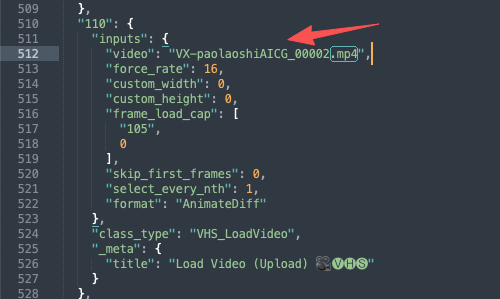 用刚才上传的文件返回值文件名,替换对应输入,举例如下:
comfyui_api_json["73"]["inputs"]["image"] = image_name
comfyui_api_json["110"]["inputs"]["video"] = video_name
comfyui_api_json["66"]["inputs"]["audio"] = audio_name
# 提交任务异步执行
payload = {
    "parameters": {
        "prompt": comfyui_api_json,
    },
    "cluster_name": "GPU-4090"  # 选择集群:GPU-4090 or GPU-A800
}
headers = {
    "Content-Type": "application/json",
    "Authorization": f"Bearer {AUTH_TOKEN}"  # Update based on your auth mechanism
}
response = requests.post(
    "https://art.huya.info/openapi/v1/workflow/task/submit",
    json=payload,
    headers=headers,
    timeout=30
)
response.raise_for_status()
result = response.json()
print(f"Task submitted successfully! Task ID: {result['data']['task_id']}")
调用会立刻返回一个task_id
# 轮询任务状态
    status_response = requests.get(
        f"{API_BASE_URL}/openapi/v1/workflow/task/{task_id}",
        headers={"Authorization": f"Bearer {AUTH_TOKEN}"},
        timeout=30
    )
    status_response.raise_for_status()
    task_data = status_response.json()["data"]
返回值包含有状态:
- 状态 status: pending、running、success、fail
- 进度 progress
# 完整代码示例
import requests
import time
import json

# Configuration
API_BASE_URL = "https://art.huya.info"
AUTH_TOKEN = "AI-xxx"

# 读取comfyui api json文件,请从海艺平台点击导出API文件
comfyui_api_json = json.load(open("/Users/bob/Downloads/test_comfyui_api_pro.json"))

# 按需上传图片、视频、音频等文件,后面替换为输入
url = f"{API_BASE_URL}/openapi/v1/workflow/upload/file"
headers = {
    "Authorization": f"Bearer {AUTH_TOKEN}"
}

with open("/Users/bob/Downloads/videos_images_audios/站立裙子人物图.jpg", "rb") as f:
    files = {
        "file": ("站立裙子人物图.jpg", f, "image/jpeg")  # 设置文件名和MIME类型
    }
    response = requests.post(url, headers=headers, files=files)
    image_name = response.json()["data"]["filename"]
    print(f"Upload image name: {image_name}")

with open("/Users/bob/Downloads/videos_images_audios/手势舞蹈视频demo.mp4", "rb") as f:
    files = {
        "file": ("手势舞蹈视频demo.mp4", f, "video/mp4")  # 设置文件名和MIME类型
    }
    response = requests.post(url, headers=headers, files=files)
    video_name = response.json()["data"]["filename"]
    print(f"Upload video name: {video_name}")

with open("/Users/bob/Downloads/videos_images_audios/小刺猬.wav", "rb") as f:
    files = {
        "file": ("小刺猬.wav", f, "audio/wav")  # 设置文件名和MIME类型
    }
    response = requests.post(url, headers=headers, files=files)
    audio_name = response.json()["data"]["filename"]
    print(f"Upload audio name: {audio_name}")

# 替换输入
comfyui_api_json["73"]["inputs"]["image"] = image_name
comfyui_api_json["110"]["inputs"]["video"] = video_name
comfyui_api_json["66"]["inputs"]["audio"] = audio_name

# 提交执行任务
payload = {
    "parameters": {
        "prompt": comfyui_api_json,
    },
    "cluster_name": "GPU-4090"  # 选择集群:GPU-4090 or GPU-A800
}
headers = {
    "Content-Type": "application/json",
    "Authorization": f"Bearer {AUTH_TOKEN}"  # Update based on your auth mechanism
}
response = requests.post(
    f"{API_BASE_URL}/openapi/v1/workflow/task/submit",
    json=payload,
    headers=headers,
    timeout=30
)
response.raise_for_status()
result = response.json()
print(f"Task submitted successfully! Task ID: {result['data']['task_id']}")

# 轮询任务状态
task_id = result['data']['task_id']
print("\nPolling task status every 5 seconds...")

while True:
    time.sleep(5)

    # 查询任务状态
    status_response = requests.get(
        f"{API_BASE_URL}/openapi/v1/workflow/task/{task_id}",
        headers={"Authorization": f"Bearer {AUTH_TOKEN}"},
        timeout=30
    )
    status_response.raise_for_status()
    task_data = status_response.json()["data"]

    status = task_data["status"]
    progress = task_data.get("progress", {})

    # 打印状态和进度
    if progress:
        total_progress = progress.get("total_progress", 0)  # 这就是百分比进度 0-100
        curr_node = progress.get("curr_node", {})
        node_title = curr_node.get("title", "Unknown")
        node_progress = curr_node.get("progress", 0)

        # 绘制进度条
        bar_length = 30
        filled_length = int(bar_length * total_progress / 100)
        bar = '█' * filled_length + '░' * (bar_length - filled_length)

        print(f"\rStatus: {status} | Progress: [{bar}] {total_progress:.1f}% | Current Node: {node_title}", end='', flush=True)
    else:
        print(f"\rStatus: {status}", end='', flush=True)

    # 检查是否完成
    if status in ["success", "fail"]:
        print("\n")
        if status == "success":
            print("Task completed successfully!")
            # 打印输出结果
            outputs = task_data.get("outputs", [])
            if outputs:
                print("\nOutputs:")
                for output in outputs:
                    title = output.get('title', 'Unknown')
                    filename = output.get('output', '')
                    if filename:
                        output_url = f"{API_BASE_URL}/api/view?type=output&filename={filename}"
                        print(f"  - {title}: {output_url}")
                    else:
                        print(f"  - {title}: N/A")
        else:
            print("Task failed!")
        break
← AI应用